

Bumper has completed its shutdown process and the application interface has been retired. All protocol vaults used for price-protection now hold zero user funds.
The smart contracts governing:
remain live on the blockchain, and users retain full, permissionless access to their assets stored in those contracts.
This page explains how to access the contracts and provides all permanent shutdown information.
BBelow are the verified contracts relevant for claiming and withdrawing tokens.
All contracts are publicly verified on Etherscan and operate autonomously according to their immutable logic.
The Bumper dApp is no longer available. You can interact directly with the contracts using:
Users remain fully in control of their assets, which are not held by Bumper or any third party.
Below are links with step-by-step instructions to withdraw your tokens from the associated contracts via Etherscan.
0x652770a3152E29506e575269E94E059278088E57
1. Go to https://etherscan.io/address/0x652770a3152E29506e575269E94E059278088E57#readProxyContract
2. Read the Stake Index by entering your wallet address into <input> (address) field of Section 21 (usersStake).
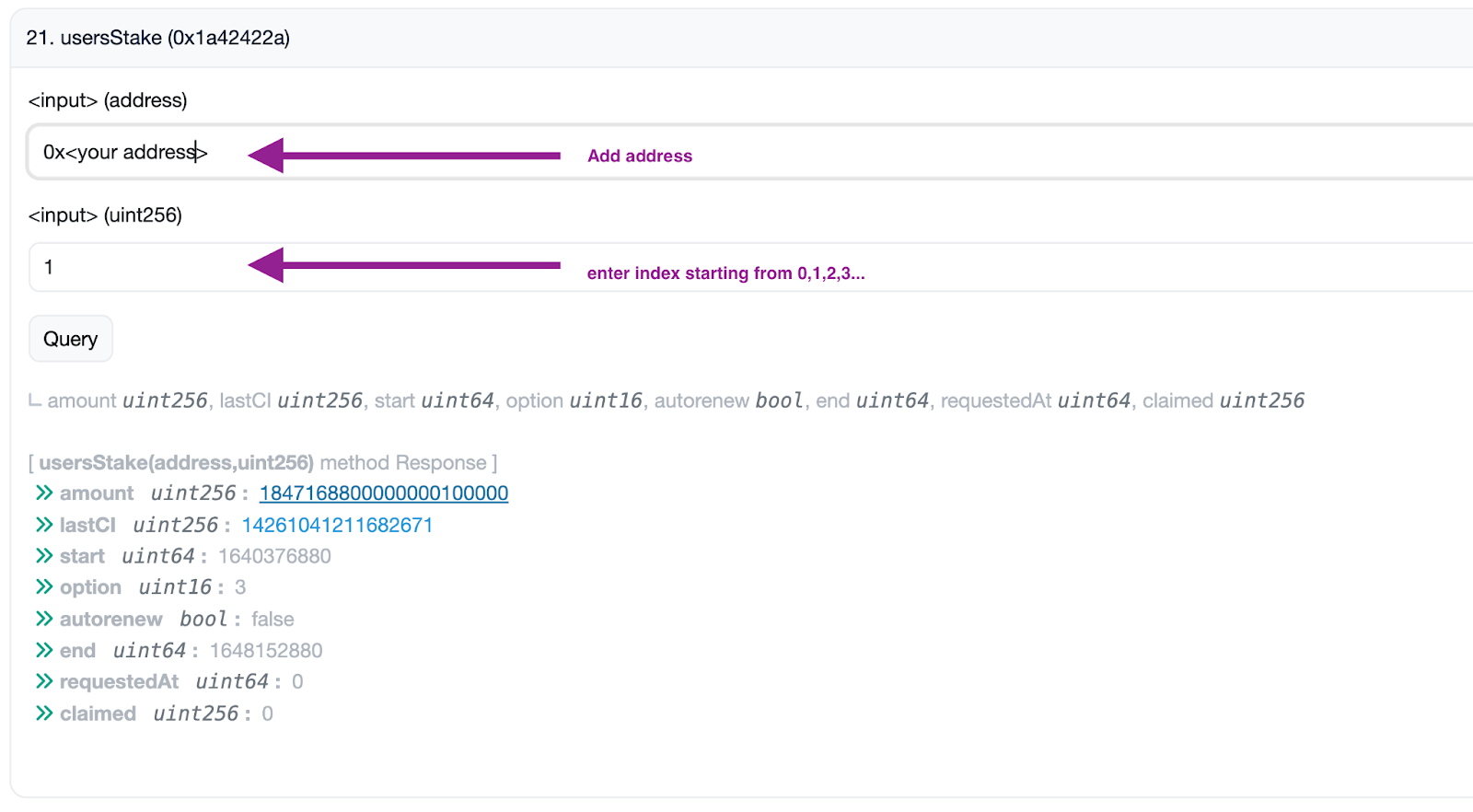
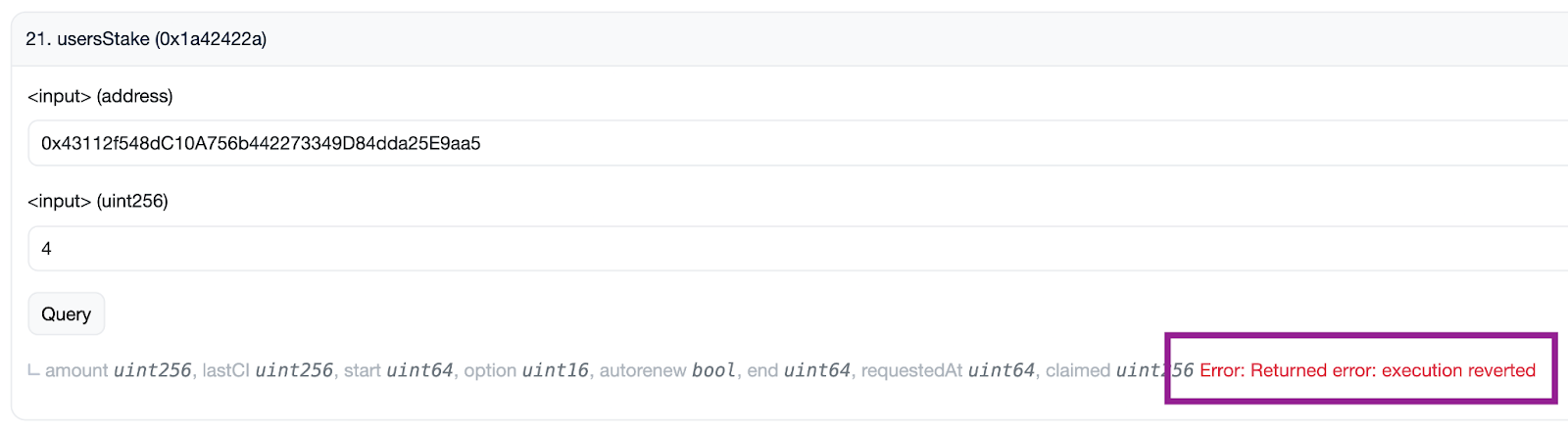
3. Enter an index number into the <input> (uint256) field. Start with the number 0, then 1, then 2, and so on, and click the "Query" button each time until you see an error message. The error should appear once you run out of indices.
4. Go to https://etherscan.io/address/0x652770a3152E29506e575269E94E059278088E57#writeProxyContract
5. Click on “Connect to Web3” and connect using the wallet address associated with your BUMP tokens. This is generally done using a dApp such as Metamask.
6. Click on emergencyWithdraw in section 3.
7. In the stakeIndex (uint16) field, enter the index number you tested in Step 3 before the error message appeared. Example: if the error message occurred on the number 8, then enter the number 7 in this step.
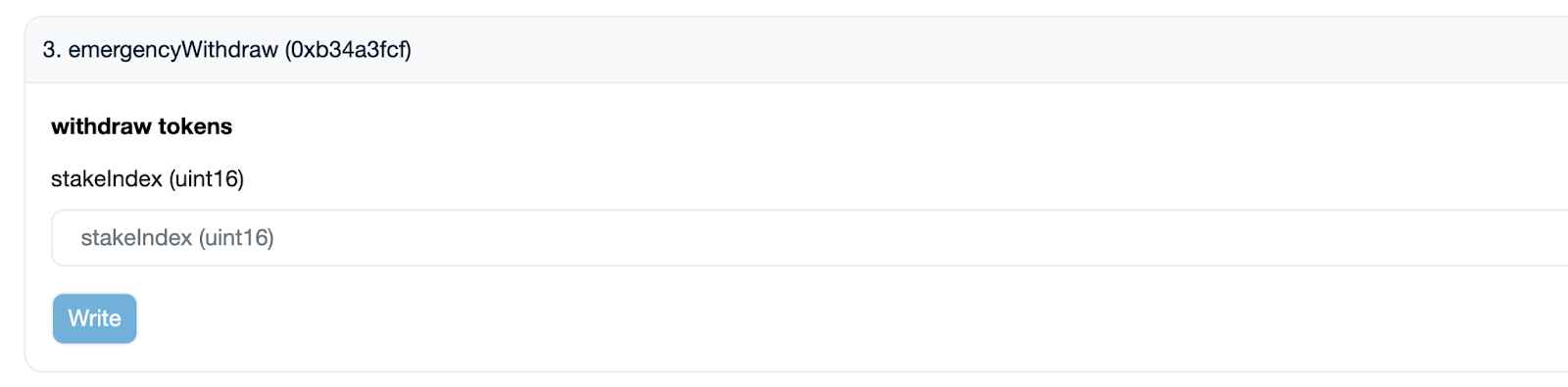
8. Click on the “Write” button and this will open a signing portal via your connected dApp.
9. Sign the transaction in your connected dApp.
Your BUMP tokens should now have been transferred to your wallet.
0xD3122B06aD755f9b8F6fBA6dFb9c684c7A373e1c
1. Go to https://etherscan.io/address/0xD3122B06aD755f9b8F6fBA6dFb9c684c7A373e1c#readProxyContract
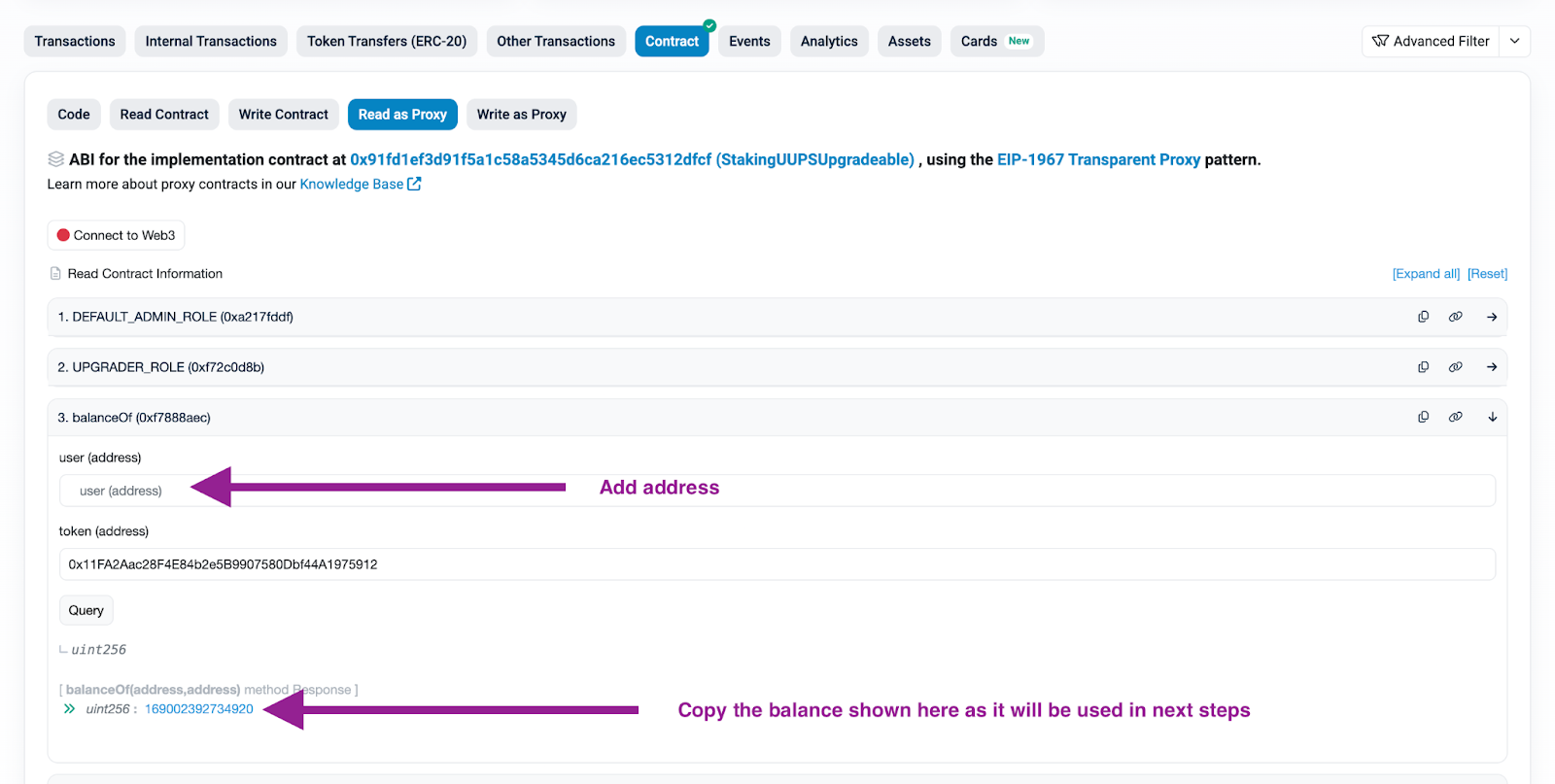
2. Read your staked balance by filling in your wallet address in user (address) field of Section 3 (balanceOf). Copy the balance to your computer’s clipboard.
3. Enter the LP Token address (0x11FA2Aac28F4E84b2e5B9907580Dbf44A1975912) into the token address field and click on the "Query" button.
4. Go to https://etherscan.io/address/0xD3122B06aD755f9b8F6fBA6dFb9c684c7A373e1c#writeProxyContract
5. Click on “Connect to Web3” and connect using the wallet address associated with your BUMP tokens. This is generally done using a dApp such as Metamask.
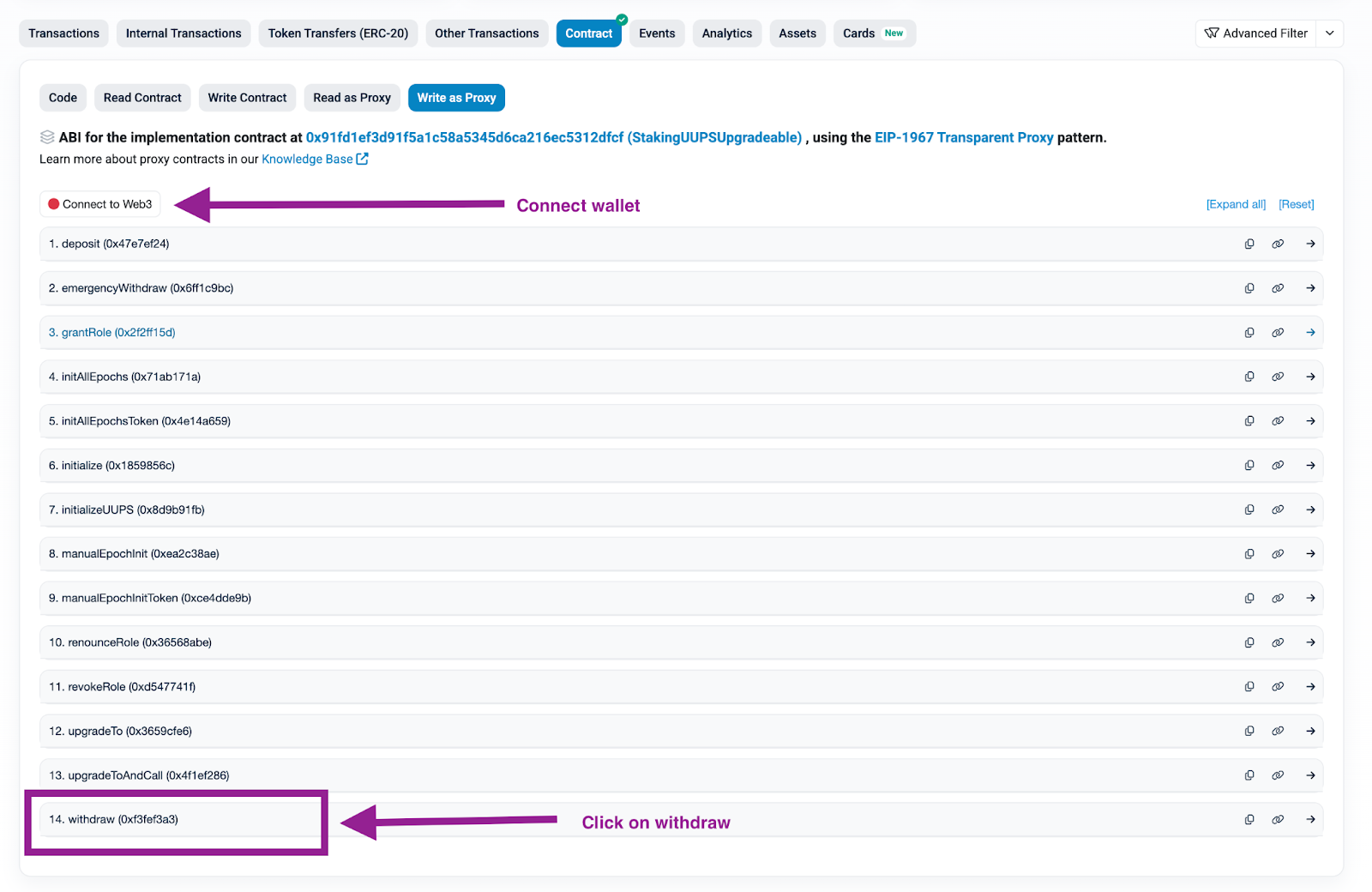
6. Enter the LP Token address (0x11FA2Aac28F4E84b2e5B9907580Dbf44A1975912) into the tokenAddress field of Section 14 (withdraw).
7. Enter the amount to withdraw in Section 14 (withdraw). This is the copied amount from Step 3 query.

7. Click on the “Write” button and this will open a signing portal via your connected dApp.
8. Sign the transaction in your connected dApp.
Your BUMP tokens should now have been transferred to your wallet.
0x653bFa3661c96eA7d5eeCBE2bf6CC0AA49c610d3
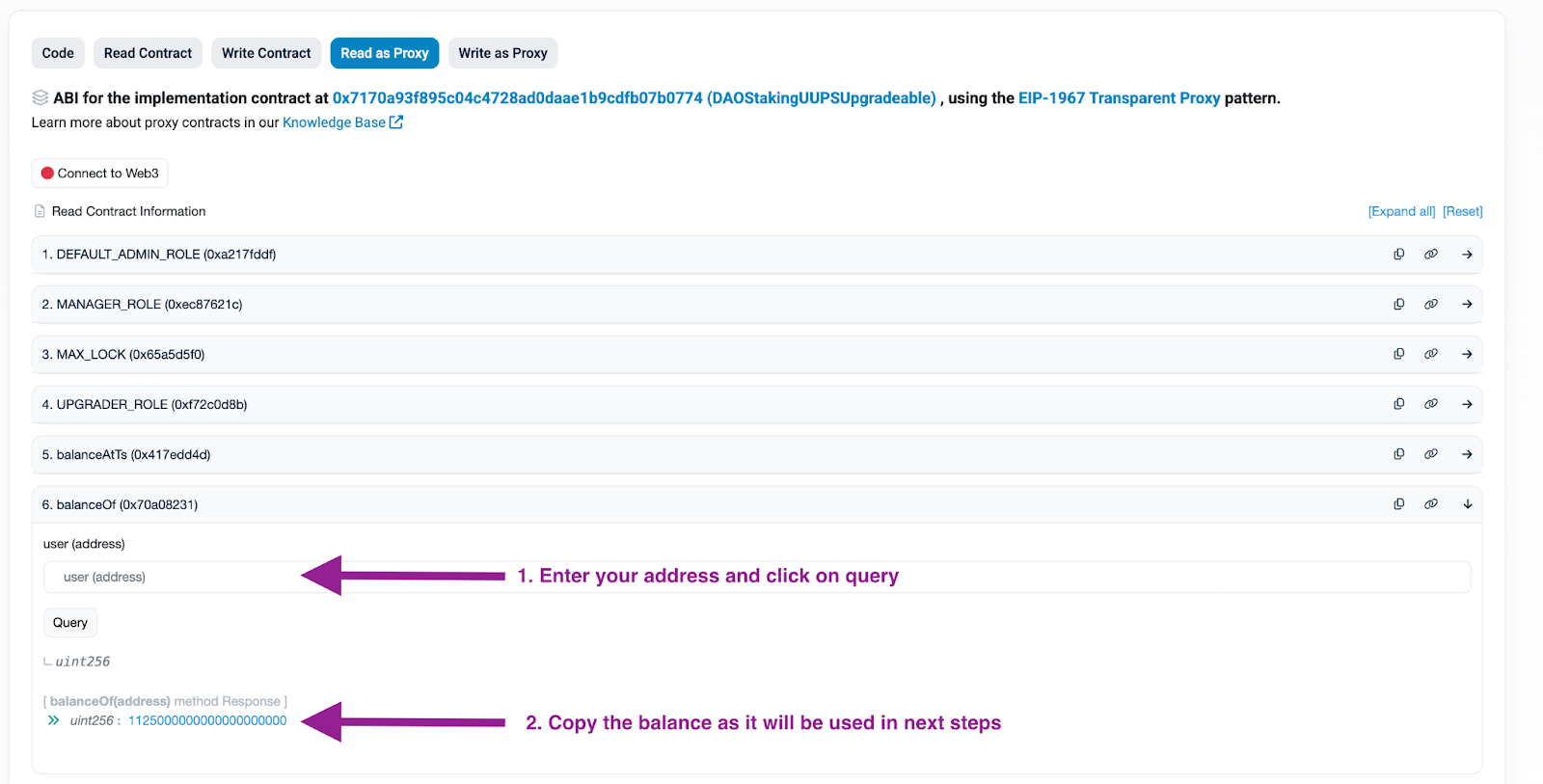
1. Go to https://etherscan.io/address/0x653bFa3661c96eA7d5eeCBE2bf6CC0AA49c610d3#readProxyContract
2. Read your staked balance by filling in your wallet address in Section 6 (balanceOf) and click on "Query" . Copy the balance to your computer’s clipboard.
3. Go to https://etherscan.io/address/0x653bFa3661c96eA7d5eeCBE2bf6CC0AA49c610d3#writeProxyContract
4. Click on “Connect to Web3” and connect using the wallet address associated with your BUMP tokens. This is generally done using a dApp such as Metamask.
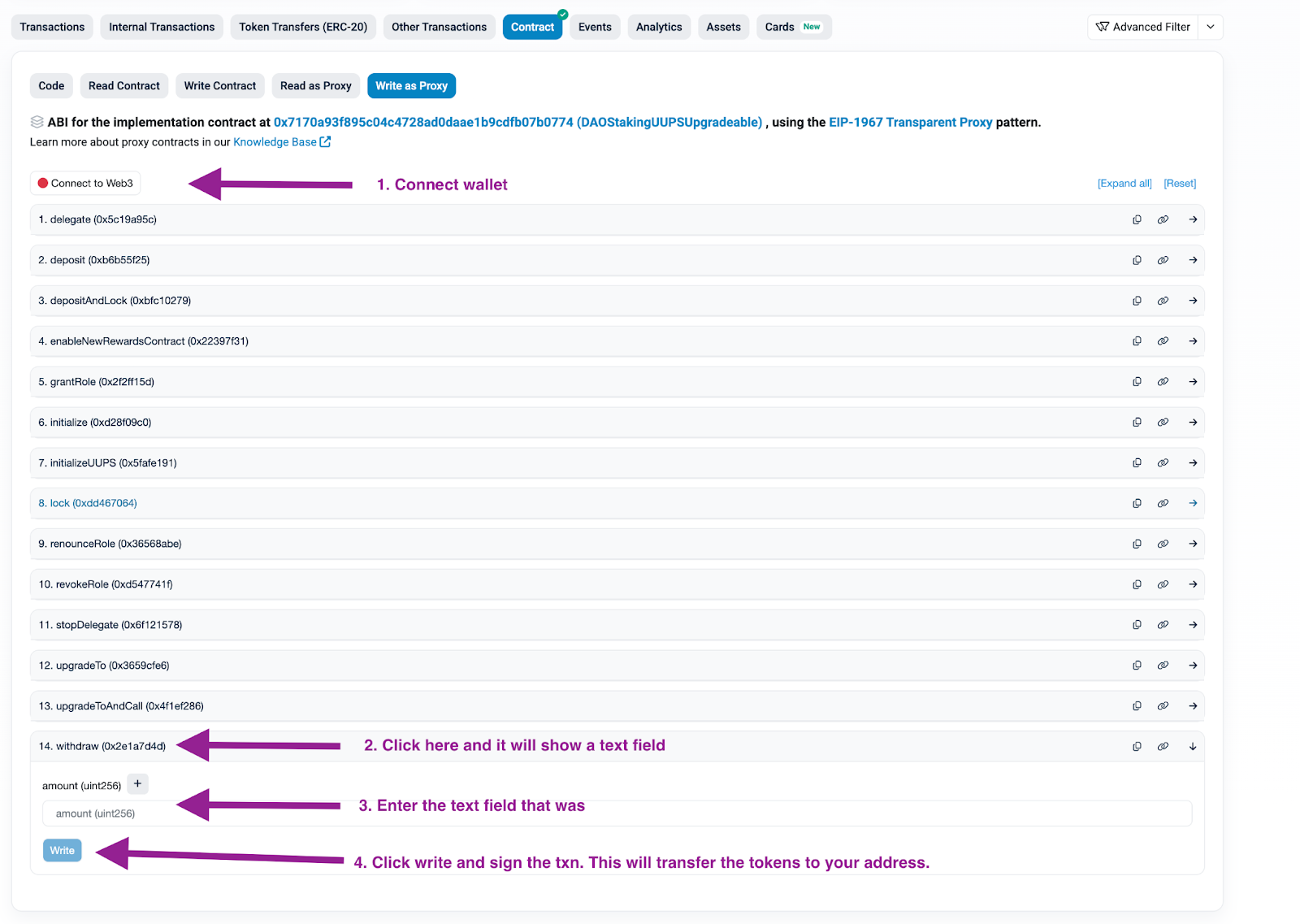
5. Enter the amount to withdraw in Section 14 (withdraw). This is the copied amount from Step 2.
6. Click on the “Write” button and this will open a signing portal via your connected dApp.
7. Sign the transaction in your connected dApp.
Your BUMP tokens should now have been transferred to your wallet and you can proceed to the Uniswapv2 BUMP/USDC pool to dissolve your LP position.
0x967583939a2E660567345CFEe6BE66870075B3d1
For specific information pertaining to claiming your vested tokens, please contact support@bumper.fi and we will provide you with a bespoke set of instructions for your claim.
This page will remain online for a limited time.
The Bumper smart contracts operate entirely on public blockchains. Bumper does not custody user assets and cannot assist with private key recovery, incorrect contract interactions, gas errors, or network issues.
Users interact with blockchain protocols at their own risk.